
Find, Group, and Merge Duplicate
Deals in HubSpot
Deal Duplicate Finder gives you a clear view of every duplicate in your HubSpot account so you can review and merge them before they affect your pipeline.
Trusted by sales teams at
A Simpler Way to Clean Duplicate Deals in HubSpot
Six core capabilities that give you full control over duplicate deal detection and merging inside HubSpot.

Flexible Duplicate Detection
Choose the deal properties you want to compare, including deal name, company, amount, email, or custom fields. Create matching rules that fit your CRM structure.

Controlled Deal Merging
Review each duplicate group, pick which records to merge, and confirm before anything changes. You stay in control at every step.

Background Scan Processing
Run duplicate scans in the background without interrupting your HubSpot workflow. Monitor scan progress and status directly from the app.

Complete Merge History
Keep a record of every merge activity with timestamps, merge details, and processing history for easier auditing and review.

Retry Failed Merges
Retry failed merges individually or in bulk when temporary processing or API issues occur during large merge

Merge Response Logs
Review merge responses and processing details for each record, including merged deal IDs, status updates, and execution timestamps.
How Deal Duplicate Finder Works
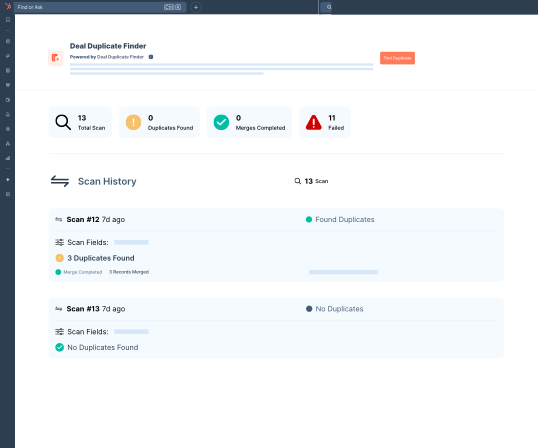
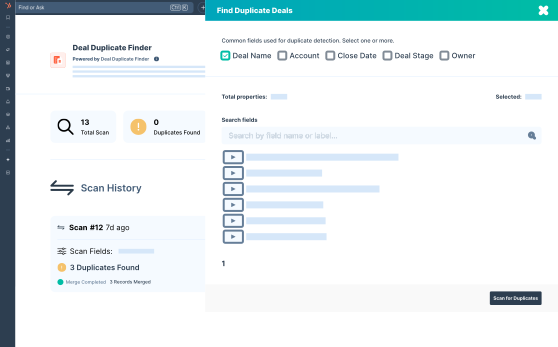
You Decide What Counts as a Duplicate
Not every CRM is set up the same way. That is why you get to decide which deal properties to compare. Pick from standard fields like deal name, amount, and company, or use any custom property in your HubSpot account. Combine multiple fields to avoid false positives and get results that actually match your data structure.
-
Multi-field matching logic

-
Support for all standard and custom deal properties
-
Scans your full deal database via the HubSpot Export API
-
Groups duplicates intelligently before review
Nothing Merges Without Your Approval
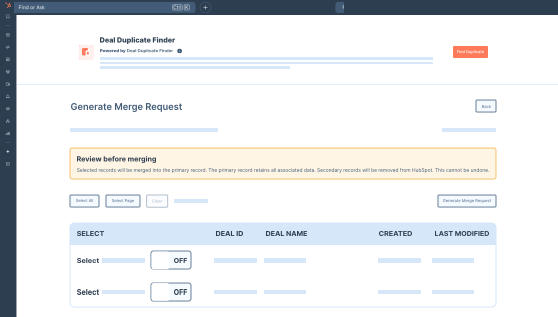
Once the scan is complete, duplicate records are presented in groups. Open any group to compare deal details side by side. Select individual records or use Select All for the entire group. You also choose which record stays as the primary. Nothing gets merged until you explicitly confirm it.
-
Side-by-side deal comparison
-
Individual or bulk record selection
-
Primary record selection (the record to keep)
-
No merges happen without your confirmation
Merge Duplicates in Bulk
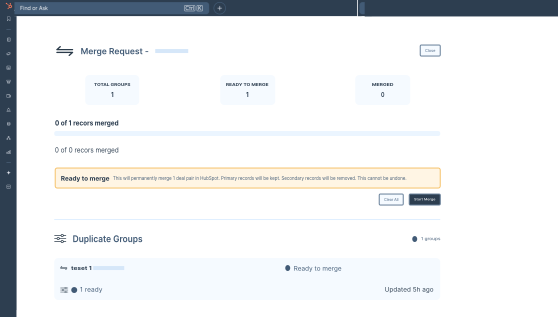
After confirming your selections, Deal Duplicate Finder sends merge requests to HubSpot via the CRM Merge API. Records within each group are merged one by one into the primary record. All associated contacts, companies, activities, and notes from the secondary records are carried over automatically by HubSpot.
-
Bulk merge across multiple groups
-
Sequential merging to maintain data integrity
-
All HubSpot associations preserved
-
Rate-limit safe processing
Track Every Merge and Revisit it Anytime
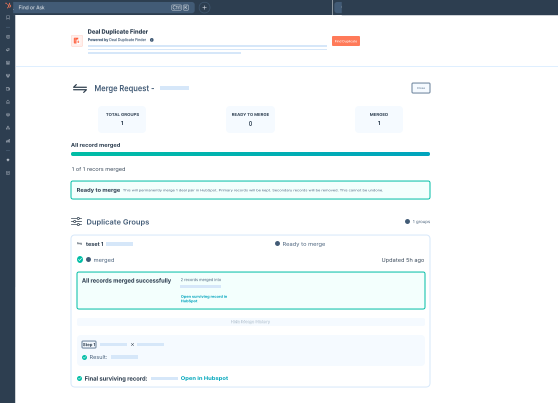
Every merge request is saved in Merge History with a live status indicator. You can check progress in real time, view the full HubSpot API response for each operation, and retry any failed merge individually without affecting the rest. The complete log stays available permanently, so you always have a record of everything.
-
Real-time merge status tracking
-
Full HubSpot API response logs
-
One-click retry for failed merges
-
Permanent audit trail
Hear It From the Actual Users
"We had 3,000+ duplicate deals built up over 2 years. Deal Duplicate Finder cleaned everything in under an hour. Our pipeline reporting is finally accurate."
"The ability to select which fields define a duplicate was exactly what we needed. Our CRM has custom deal properties and they all work perfectly."
"The merge history and audit logs are invaluable for our compliance team. We know exactly what was merged, when, and by whom. No more guesswork."
Ready to Clean Up Your HubSpot Deals?
Install Deal Duplicate Finder, run a scan, and get a clear picture of what needs to be merged. Takes less than 60 seconds to get started.
*Free to install. No credit card required.